Compare AI product photography generators for white background images, studio shots, lifestyle scenes, and ecommerce campaign visuals.
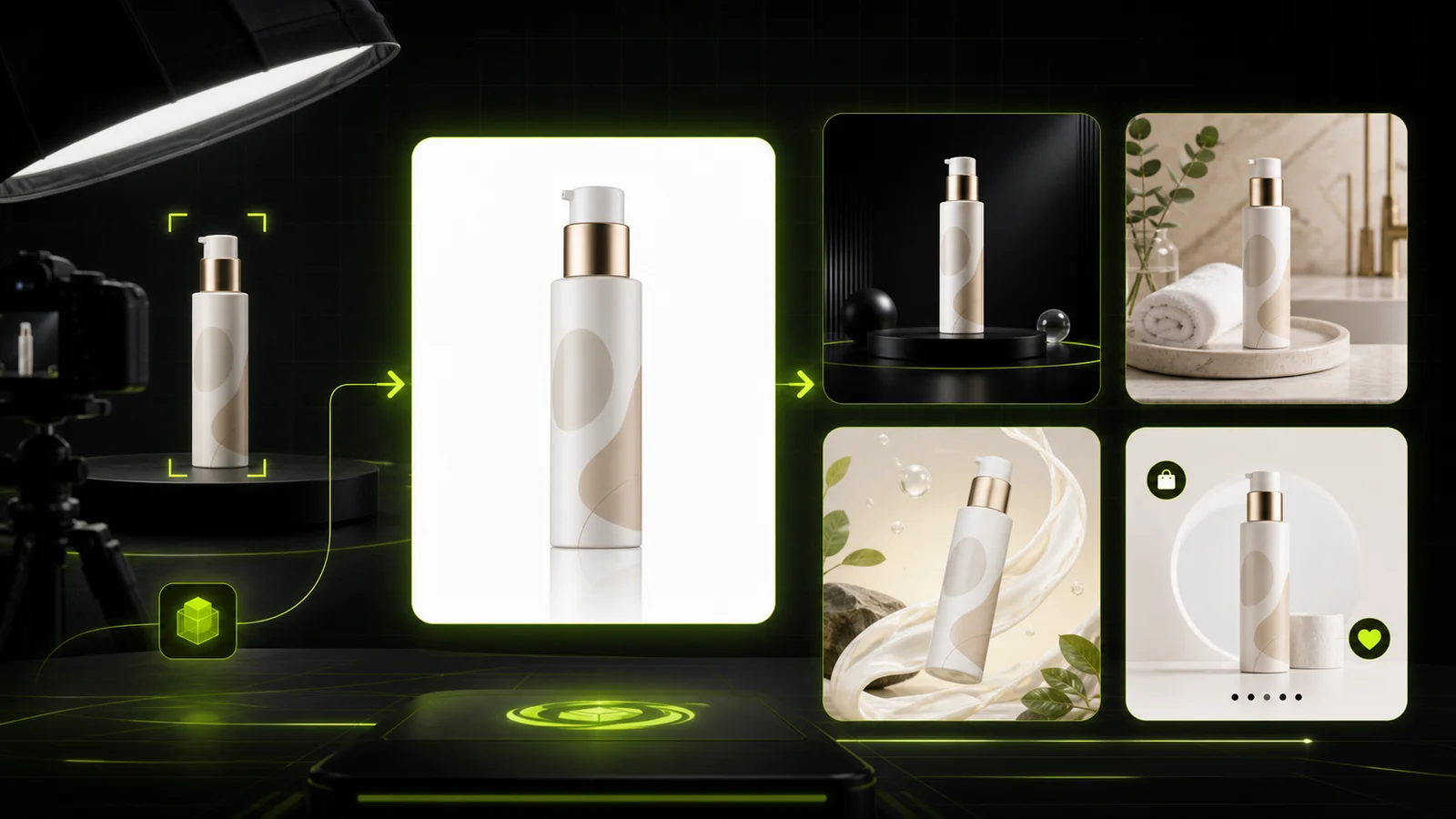
If you sell products online, an AI product photography generator is the fastest way to turn a single product photo into clean catalog shots, studio scenes, lifestyle images, and ad creatives — without renting a studio, hiring a photographer, or waiting through reshoot delays.
Below you'll find a practical comparison of the best AI product photography generators (including free tools and tools with API/batch workflows for high-volume sellers).
Quick Comparison: 7 Best AI Product Photography Generators at a Glance
Before diving into the details, here's a brief overview:
- ProductShot AI: the best ecommerce pick when you need locked product fidelity plus marketplace-ready outputs across white-background, studio, lifestyle, and ad formats.
- Photoroom: the most mature all-around platform for one-click editing, batch processing, and API automation.
- Pebblely: the easiest budget pick with strong text/packaging preservation for solo founders and Etsy sellers.
- Flair.ai: the creative-team choice with drag-and-drop scene canvas and deep art-direction controls.
- Claid.ai: the enterprise/API-first option for brands that need scalable image pipelines and catalog automation.
- Pixelcut: the best batch/mobile utility for mobile-first sellers and small teams that batch-edit at scale.
- CreatorKit: the best Shopify-plus-ads stack when you want product photos, static ads, and video variations from one place.
Now, let's take a closer look at each tool.
1. ProductShot AI — The Best AI Product Photography Generator for Ecommerce
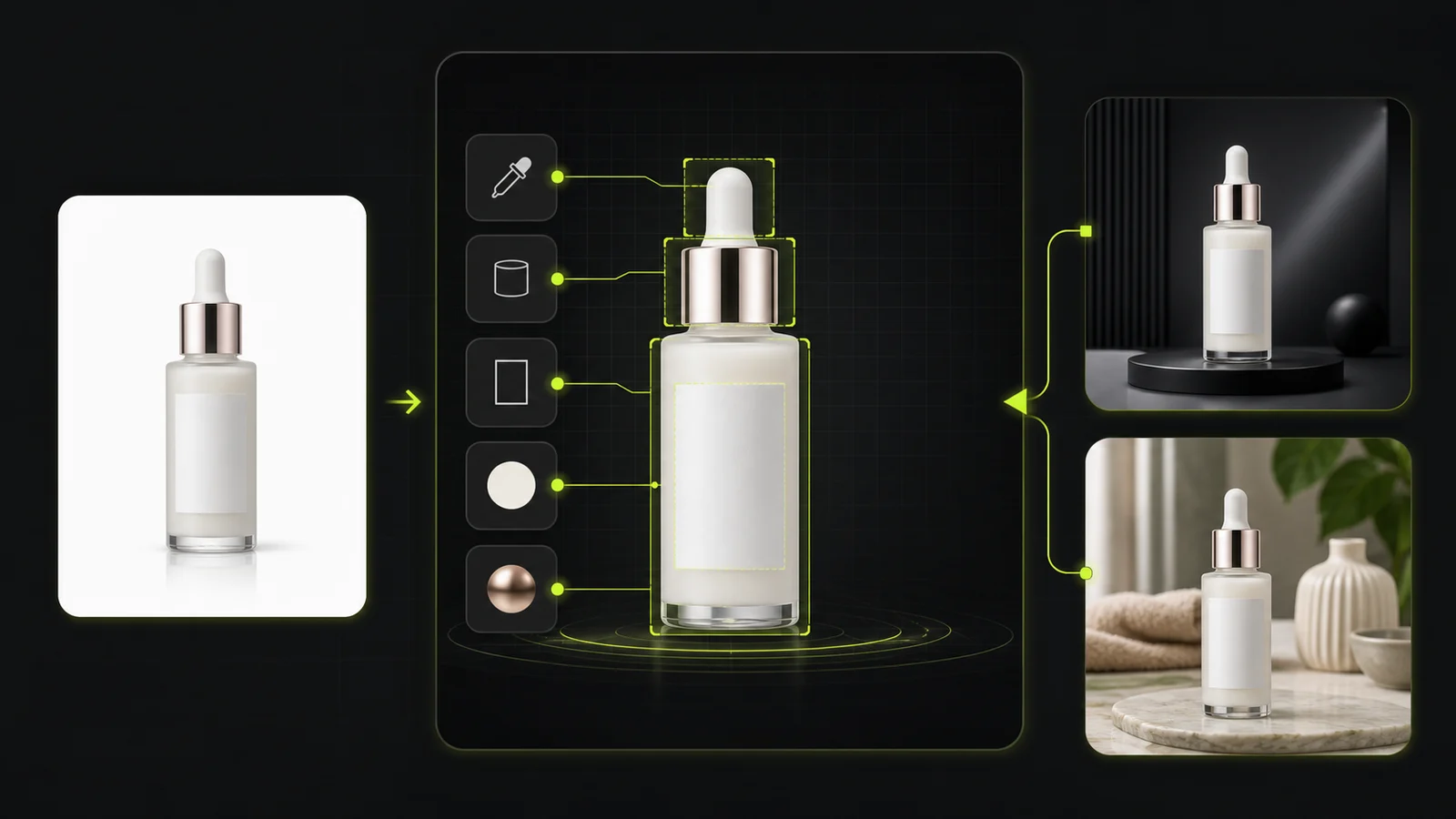
ProductShot AI is built around one core idea: lock the product, then generate the scene. You upload a single product photo, and the platform preserves your product's logo, shape, labels, packaging, color, material, and proportions while rebuilding the environment around it.
The tool goes far beyond a simple background remover. It offers quick templates for different commerce contexts — Ecommerce White Background, Premium Display, Lifestyle Real, Social Neon, and Natural Outdoor — plus a unique lens-language system that lets you control composition without writing prompts. Choose from Standard 50mm for natural perspective, Close-up 85mm for premium crops, Macro 100mm for texture and labels, Documentary 35mm for natural usage feel, Wide 24mm for scene context, Bokeh for soft background depth, and more.
Key Features
- Product Lock that preserves logo, shape, labels, packaging, color, and material across every output
- Quick scene templates: Ecommerce White BG, Premium Display, Lifestyle Real, Social Neon, Natural Outdoor
- Lens-language presets: Standard 50mm, Close-up 85mm, Macro 100mm, Documentary 35mm, Wide 24mm, Bokeh, Foreground Layer, Geometric, Fisheye
- Scene, lighting, camera angle, and ratio controls with marketplace presets (Amazon, Shopify, Etsy)
- Reference-image inputs to steer brand mood and composition
- Before/after comparison workflow
- Reusable image history for seasonal campaigns and A/B testing
- AI background editing, photo enhancement, and product image generation
Best For
- Amazon, Shopify, and Etsy sellers who need marketplace-compliant images with the product kept intact
- DTC brands running product launch campaigns that need multiple scene variations from one upload
- Agencies and teams that want consistent brand imagery across white-background, studio, lifestyle, and social formats
Pricing (checked June 2026)
- Annual Starter: $9.9/month for 800 credits
- Annual Premium: $19.9/month for 2,000 credits
- Annual Advanced: $49.9/month for 6,000 credits
- One-time packs available: 800 credits for $29.9, 2,000 for $59.9, 6,000 for $149.9
- Paid tiers include commercial usage, HD export, and priority support
Pros
- Clearest product-preservation story in the category — SKU identity is locked before scenes are generated
- Concrete camera/lens/ratio controls instead of only prompt-based generation
- Built-in marketplace and campaign workflows for Amazon, Shopify, Etsy, and social
- One source image can produce 6+ output styles across different channels
Cons
- Some modules in the tools index still show "Soon," including batch processing and certain product-photo variants
- No mobile app; currently web-only
2. Photoroom — The Most Mature All-in-One Platform
Photoroom combines AI product photography with a full editing suite, batch processing, and API access. It is one of the most established tools in this space, with a strong focus on marketplace sellers and growing ecommerce teams.
You upload a product photo, and Photoroom's AI generates clean backgrounds, lifestyle scenes, or white-background catalog shots. Its Product Staging feature automatically places products into contextual environments, while the Batch Mode lets you process hundreds of images at once.
Key Features
- AI backgrounds and Product Staging for lifestyle scenes
- Batch Mode for high-volume processing (up to 4,000+ exports/month on higher tiers)
- Product Beautifier for lighting and polish
- Virtual Model for on-model product shots
- White-background workflows for marketplace compliance
- Shopify publishing on Max plan
- API for background removal and image editing
Best For
- Resellers and marketplace sellers with large catalogs
- Growing ecommerce teams that need one-click editing plus batch throughput
- Businesses that want mobile and web accessibility with API automation
Pricing (checked June 2026)
- Free: limited AI tools, 250 exports/month
- Pro: from $7.50/month (annual), advanced AI tools, 500 batch exports/month
- Max/Ultra: higher tiers with better AI models and 1,500–4,000+ batch exports/month (exact web prices unconfirmed in public pages)
- API: starts at $20/month for background removal, $100/month for image-editing API
Pros
- Strongest blend of one-click editing, batch throughput, and API automation
- Commerce-native rather than generic creative software
- Mobile and web apps for on-the-go editing
Cons
- Automatic Product Staging is fast but less art-directable than canvas-style tools
- Higher-quality AI models are gated above the entry tier
- Pricing transparency is weaker for Max/Ultra plans
3. Pebblely — The Easiest Budget Pick with Text Preservation
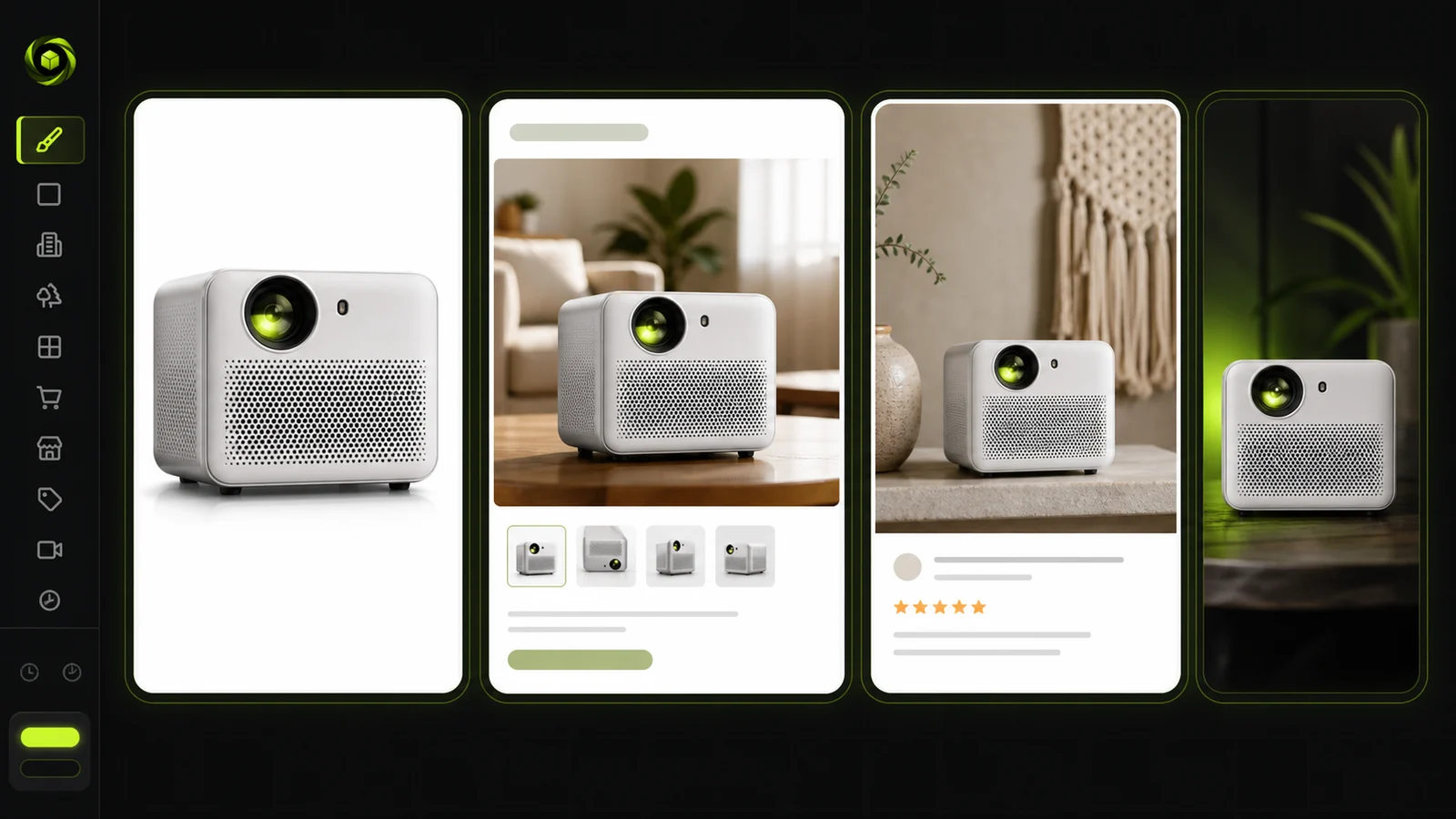
Pebblely focuses on speed and simplicity. Upload a product photo, pick from 100+ templates or describe a custom scene, and get a polished product image in seconds. What sets Pebblely apart is its automatic text extraction and preservation — labels, packaging text, and brand names stay readable in the generated output.
The tool also offers built-in aspect presets for Instagram, TikTok, website banners, and Facebook ads, making it easy to export platform-ready images without manual resizing.
Key Features
- 100+ scene templates with custom prompting
- Style, color, and reference-image guidance
- Built-in aspect presets for Instagram, TikTok, website banners, Facebook ads
- Bulk generation and bulk download (up to 25 products at a time)
- High-resolution mode (costs 2 credits per image)
- Automatic text extraction and preservation for labels and packaging
Best For
- Solo founders and Etsy sellers who want fast, affordable product images
- Beauty, CPG, food, and beverage brands where label fidelity matters
- Anyone who values speed and simplicity over creative complexity
Pricing (checked June 2026)
- Lite: $9/month for 30 images/month
- Basic: $19/month for 200 images/month, bulk generate
- Pro: $39/month for 500 images/month, bulk generate
- Annual plans offer additional savings
Pros
- Fast learning curve; pricing is easy to understand
- Text-preservation is a real advantage for packaging-heavy products
- Good balance of affordability and ease of use
Cons
- Less enterprise-grade than Claid or Photoroom API workflows
- Less collaborative than Flair.ai for team-based creative work
- Bulk generation is limited to ~25 products at a time
4. Flair.ai — The Creative Team's AI Workspace
Flair.ai takes a different approach from one-click tools. It offers a drag-and-drop scene canvas where you can compose product imagery with full art-direction control. You can build reusable templates, create branded product imagery, generate on-model photography, and even produce AI product videos.
The platform is designed for teams that care about visual storytelling — not just clean catalog shots, but campaign-grade imagery with intentional composition, lighting, and mood.
Key Features
- Drag-and-drop scene canvas for full composition control
- Reusable templates for brand consistency
- Branded product imagery and on-model photography
- AI product videos and AI marketing/ad generation
- Custom product and human models
- Image upscales and variations
- Team collaboration tools
- Enterprise API
Best For
- Design-led brands and creative agencies that need more art direction than one-click tools provide
- Fashion, jewelry, and lifestyle brands where manual composition matters
- Teams that want collaborative workflows for campaign imagery
Pricing (checked June 2026)
- Free: $0
- Pro: $8/month
- Pro+: $26/month (up to 8 standard or 2 fast custom models, 80 generated images, commercial license)
- Scale Tier 1: $38/month (150 generated images, API early access, priority support)
- Enterprise: custom (unlimited API, SSO, dedicated support)
- Note: instant image generation and ad generation consume quota at 4x the standard rate
Pros
- Best scene-control story in the category
- Strong collaboration features for teams
- Excellent for fashion, jewelry, and campaign imagery
Cons
- More complex than "upload and generate" tools
- Quotas are tighter than they first look because some generation modes cost more
- Limited mobile support compared with simpler editor-first tools
5. Claid.ai — The Enterprise/API-First Image Pipeline
Claid.ai is built for brands, retailers, and marketplaces that need to process thousands of images at scale. Its AI Photoshoot feature generates studio and lifestyle scenes, but the platform's real strength lies in its automation: enhancement, upscaling, shadow generation, light/color correction, generative resize, and marketplace-compliant processing — all available via API.
Claid is less about creative exploration and more about operational efficiency. If you need to onboard sellers, standardize product imagery, and process images to platform requirements in seconds, this is the tool.
Key Features
- AI Photoshoot with precise and creative generation modes
- Enhancement and upscale for existing images
- Shadow generation and light/color correction
- Generative resize for multi-platform output
- AI edit for scene modifications
- Marketplace/platform requirement processing
- API with 20+ operations
- Enterprise workflow support and Zapier integration
Best For
- Larger brands, retailers, and marketplaces needing scalable image pipelines
- Ops teams that prioritize automation and catalog-scale processing
- Businesses where enhancement, normalization, and API integration matter as much as raw scene generation
Pricing (checked June 2026)
- Web app: free trial with 50 web credits and 50 API credits
- Business web pricing: custom
- API is credit-based: AI backgrounds 3 credits/image, AI fashion 2, AI edit 2, background removal 2, light/color 1, shadow generation 1, generative resize 2
Pros
- Strongest automation posture in the category
- Fast processing and catalog-scale focus
- Especially good for enhancement, normalization, and API-heavy workflows
Cons
- Web pricing is comparatively opaque
- The platform is more operational than beginner-friendly
- Casual users may not need this much infrastructure
6. Pixelcut — The Best Batch/Mobile Utility
Pixelcut combines AI product photography with strong batch-editing capabilities and a consumer-friendly UX. It is particularly popular among mobile-first sellers who want to generate product images, remove backgrounds, and batch-edit photos without a steep learning curve.
The platform supports AI product backgrounds and styling, background removal, upscaling, AI shadows, batch editing, ZIP export, Dropbox import, and even a virtual try-on feature.
Key Features
- AI product backgrounds and styling
- Background removal and upscale
- AI shadows for realistic depth
- Batch editing with ZIP export
- Dropbox import for cloud workflows
- API for developers
- Virtual try-on
- Strong mobile app support
Best For
- Mobile-first sellers and content teams that batch-edit at scale
- Small teams that want one tool for social, catalog, and product-photo generation
- Businesses looking for an easy-to-adopt consumer UX
Pricing (checked June 2026)
- Free: $0/month
- Paid web plan: $10/month (600 AI credits, unlimited background removal/upscale, 3-person team, 1,000 batch exports/month)
- Higher web plan: $30/month (3,600 AI credits, 10-person team, 2,000 batch exports/month)
- API: $0.01 per credit, starting at 1,000 credits for $10 (100 free API credits for developers)
Pros
- Strongest bulk-editing story for non-enterprise users
- Easy for small teams to adopt
- Very strong consumer UX and mobile support
Cons
- Plan naming is confusing across public pages
- Some product-photography value sits inside a broader creator platform rather than a tightly defined commerce workflow
- Advanced generation consumes credits quickly depending on model choice
7. CreatorKit — The Best Shopify-Plus-Ads Stack
CreatorKit goes beyond product photos into full ad creative production. It offers AI product photos with category-specific templates, an ecommerce-specific AI image editor that preserves products while blending reflections and shadows, plus AI ads, video ads, AI actors/clones, and avatar video generation.
The platform is deeply integrated with Shopify, allowing sellers to generate and publish product images directly from the Shopify admin.
Key Features
- AI product photos with category-specific templates
- Ecommerce-specific AI image editor with product preservation
- AI ads and video ads generation
- AI actors/clones/avatar video for social content
- AI variations for A/B testing
- Shopify integration from admin
Best For
- Shopify brands and growth teams that want product photos, static ads, and video variations from one stack
- Teams that need to go beyond catalog shots into actual ad creative production
- Businesses running paid social campaigns that need both images and video
Pricing (checked June 2026)
- Free: $0/month
- Pro: $39/month monthly / $32/month annual
- Business: $82/month (annual)
- CreatorKit markets "unlimited generations" while tying practical usage to download/generation controls
Pros
- Deeply commerce-oriented editor with product preservation
- Strongest Shopify-native angle in the list
- Goes beyond photos into actual ad creative production
Cons
- Pricing is harder to parse than pure-play photo tools
- Broad feature set may feel excessive if you only want simple catalog shots
- Some higher-end video/clone features sit in beta or specialized plans
How to Choose the Right AI Product Photography Generator
A few practical lenses to filter tools through:
1. Product Fidelity
The single biggest fear in AI product photography: "Will the AI change my actual product?" If your products have specific logos, labels, packaging text, or color accuracy requirements, prioritize tools with explicit product-preservation features. ProductShot AI's Product Lock and Pebblely's text extraction are the strongest answers to this concern. Claid's enhancement pipeline also preserves product details while improving image quality.
2. Your Output Format
Think about what you actually need:
- White-background catalog shots. ProductShot AI (Ecommerce White BG template), Photoroom, and Pixelcut all excel here.
- Studio-style product photos. ProductShot AI (Premium Display), Claid (AI Photoshoot), and Flair.ai (scene canvas) offer the most control.
- Lifestyle scenes. ProductShot AI (Lifestyle Real), Pebblely (100+ templates), and Flair.ai (drag-and-drop canvas) are strong options.
- Social/ad creatives. ProductShot AI (Social Neon), CreatorKit (AI ads + video), and Flair.ai (marketing generation) cover this well.
3. Volume and Automation
- Under 100 SKUs. Pebblely, Pixelcut, or ProductShot AI in the browser will be fine.
- Hundreds to thousands of SKUs. Look for APIs, batch processing, and workflow builders. Photoroom's Batch Mode, Claid's 20+ API operations, and Pixelcut's batch export are built for this scale.
4. Platform Compliance
Different platforms have different image requirements. Make sure your tool can output compliant images:
- Amazon: main image must have a pure white background and be a truthful product representation
- Etsy: recommends listing images at 2000+ pixels; first photo should be at least 635px wide and tall
- Shopify: supports uploads up to 5000×5000px / 20MB; 2048×2048 square images recommended
- Meta Ads: supports multiple placement ratios, so you need multiple exports
ProductShot AI's marketplace presets and Photoroom's platform-specific workflows address these requirements directly.
5. Team Collaboration
If you're a solo founder, Pebblely or Pixelcut will be enough. If you're a creative team, Flair.ai's collaborative canvas and reusable templates are designed for team workflows. For enterprise ops teams, Claid's API and Photoroom's batch workflows support larger organizations.
6. Budget and Free Functionality
Before committing, test the free tier of two or three tools that match your needs. Pay attention to output quality, watermark policies, and whether the free plan limits key features. A tool that looks cheap at $9/month can become expensive if it lacks the features you need and forces you to add other subscriptions on top.
Frequently Asked Questions
Can AI product photography replace a traditional shoot?
For catalog and marketplace images — increasingly, yes. AI tools can generate white-background, studio, and lifestyle shots from a single product photo in seconds. For hero campaign imagery or highly creative brand shoots, AI can reduce the number of setups and reshoots but may not fully replace a professional photographer's eye.
Are AI product photos allowed on Amazon or Etsy?
Yes, as long as the images accurately represent the product. Amazon requires a pure white background for main images and truthful product representation. Etsy recommends high-resolution images. Always verify that the AI output matches what customers will actually receive — check labels, colors, packaging, and included accessories.
How do I keep labels and packaging accurate?
Use tools with explicit product-preservation features. ProductShot AI's Product Lock preserves logo, shape, labels, packaging, color, and material. Pebblely's text extraction automatically preserves packaging text. For any tool, always compare the AI output with your original product photo before publishing.
What is the best AI tool for white-background ecommerce images?
ProductShot AI offers a dedicated Ecommerce White Background template with Product Lock to keep the product intact. Photoroom and Pixelcut also provide strong white-background workflows. The best choice depends on whether you need single-image quality (ProductShot AI), batch throughput (Photoroom), or mobile-first editing (Pixelcut).
How much does AI product photography cost?
Most tools offer free tiers or trials. Paid plans typically range from $8 to $82 per month depending on features and volume. Credit-based systems (like ProductShot AI at $9.9/month for 800 credits) are common. For high-volume sellers, API pricing (like Claid's per-operation credits or Pixelcut's $0.01/credit API) can be more cost-effective than per-image plans.